
vamoose
Calendar workflows, minus the tedium.
The moose does the paperwork. You go to the beach. The office rituals that sprawl across calendar invites, email threads, approval chases, and HR portals become one command that runs itself, on Microsoft Graph, Google, iCloud, or any CalDAV host.
brew install dcadolph/tap/vamoose
You know this dance
By hand
Booking a week off
- Open the work calendar, Google or Exchange. Create the event, mark it Free, invite exactly one person: your manager, as optional.
- Slack your manager so the invite doesn't land cold: "thinking about the 20th through the 24th, that OK?"
- Approved. Back into the event: add every teammate covering for you, one at a time.
- Triple-check it still shows Free, or six calendars go busy for a week.
- Your own calendar still shows you open, so create a second event, just you, marked Out of office.
- Log in to the HR portal and file the leave.
- Next quarter, do all of it again from memory.
With vamoose
$ vamoose off next week
One workflow runs the whole thing. The hold goes out marked Free with your manager on it, their calendar accept is the approval, the team lands as optional attendees the moment it arrives, Slack and email get told, the leave gets filed in HR. The blocked-out event for your own calendar is one more line: vamoose away.
Same command whether this job runs on Microsoft, Google, or iCloud. The workflow never notices which service is behind it, so neither do you.
How it works
Why vamoose
-
Any calendar
Microsoft Graph, Google, Apple iCloud, and any CalDAV host, behind one interface. Switch providers, change nothing.
-
A real workflow engine
Branch on outcomes, gate on approval, guard by day or headcount. It books half days, counts working days around holidays, and warns when too many teammates are already off. A state machine in JSON, not a dumb calendar rule.
-
Approvals that mean it
Manager, then director, in sequence. Timeouts that act on silence, decline paths, and the accept-the-invite signal, no approval product to buy.
-
Acts on time
Wait steps pause a run. Schedules rerun a whole workflow weekly. It moves on its own in the background, and resumes where it left off after a crash.
-
Drivable by AI
Over MCP, an agent discovers, previews, runs, schedules, and even authors workflows. The calendar-workflow layer for Claude.
-
Finishes the job
Fan out to the team, announce to Slack, email, or any webhook, file the leave in your HR system, show what you have left, and keep a run history of who approved what.
Design it on a canvas
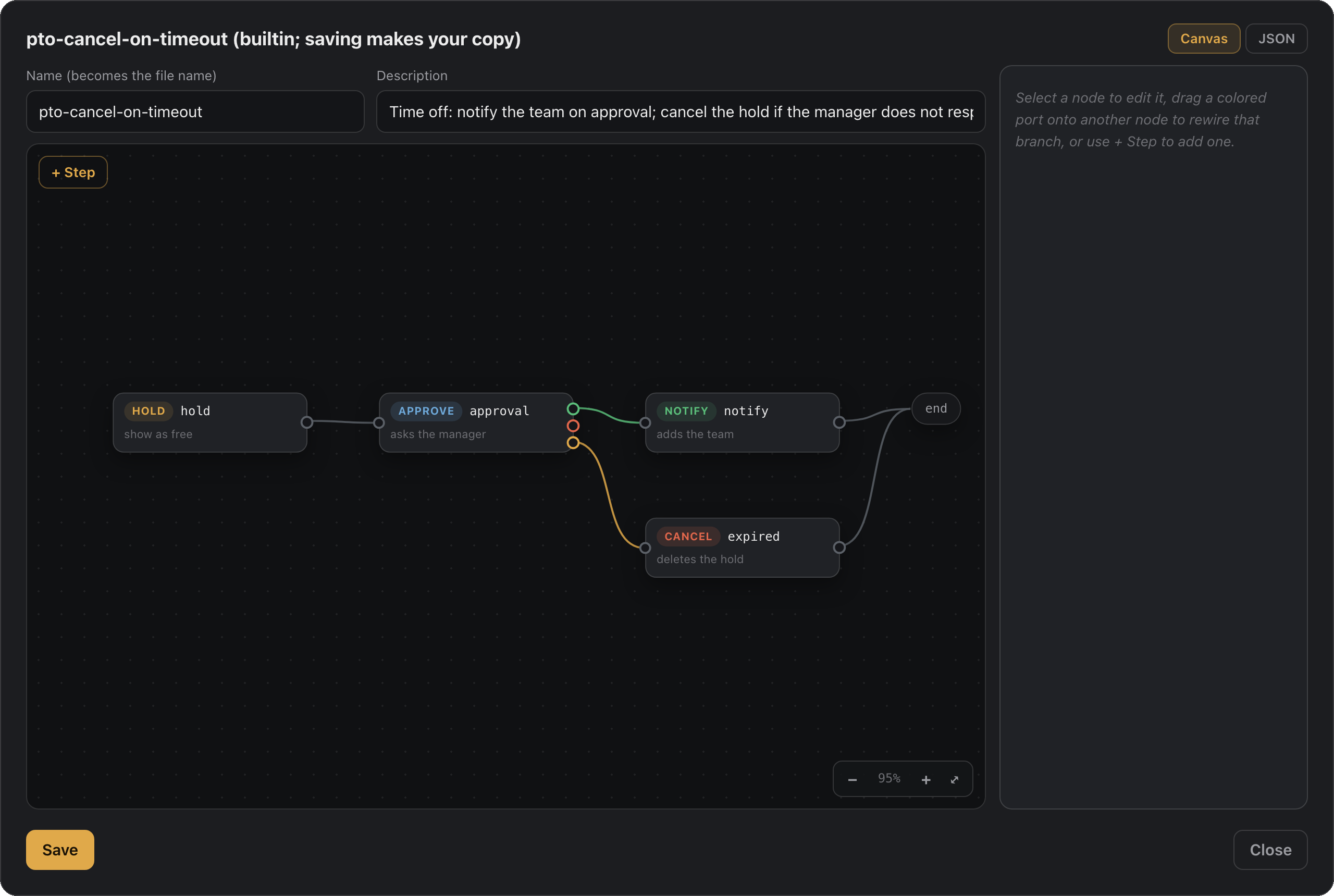
The dashboard ships a workflow canvas: every step is a node, and the branches are the wires. An approve step's outcomes leave from colored ports, accepted green, declined red, expired amber, and land where you point them: drag a port onto another node and that branch is rewired.
Click a node to edit its fields in the side panel, drag nodes to arrange the graph, add steps from the toolbar. The JSON stays one tab away, and both views save through the same validation as the CLI.
vamoose app, then open any workflow.
Start here
| Guide | What's in it |
|---|---|
| Quickstart | Zero to your first approved hold in a few minutes. |
| Concepts | How holds, approval, and workflows fit together. |
| Commands | Every command, flag, and environment variable. |
| Workflows | Design your own, with branching, delays, and guards. |